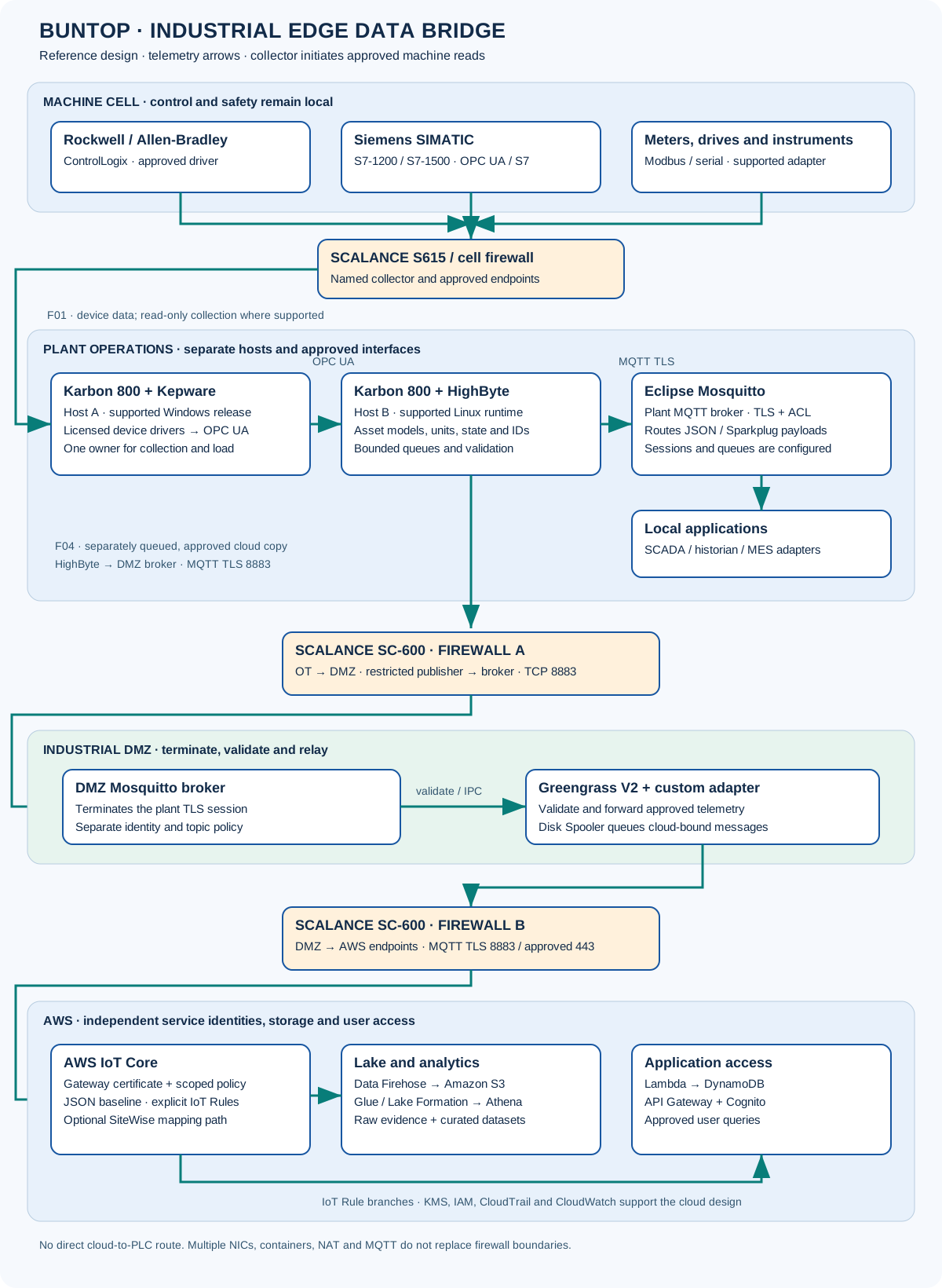
Karbon hosts it. Kepware connects it. HighByte gives it context. Mosquitto delivers it. SCALANCE controls which connections can cross the boundary.
REFERENCE DESIGN · REVIEWED OCTOBER 2026
Practical product roles and example settings. Hardware configuration, software versions, licenses, capacity and security rules require site review. The chart shows separate hosts and firewall zones; it does not claim this system is installed at a client plant.
Select a labeled component in the chart or use the buttons below to explore its role. Arrows show telemetry data direction. The connection register identifies which system opens each session.
Baseline: HighByte sends one approved cloud copy through the DMZ. A Mosquitto bridge is an optional alternative described below; do not enable parallel copies without an event identity and deduplication plan.
Hardware, connectivity, DataOps, messaging and security
Component
Role
What it does
What to confirm
OnLogic Karbon 800
Industrial hardware
Runs approved OS and edge software on a rugged compute platform.
It is not a protocol translator or a firewall merely because it has several NICs.
PTC Kepware Server / KEPServerEX
Device connectivity
Uses selected drivers to acquire machine values and expose supported interfaces such as OPC UA.
MQTT / REST depend on product, release, plug-in and license; they are not assumed in every base installation.
HighByte Intelligence Hub
Industrial DataOps
Models and contextualizes data, validates mappings and routes approved datasets.
Governed models reduce drift; they do not remove the need for schema control, testing and ownership.
Eclipse Mosquitto
MQTT message broker
Authenticates clients, authorizes topics and routes published payloads to subscribers.
A broker neither creates ISA-95 context nor automatically decodes Sparkplug or ensures end-to-end retention.
Siemens SCALANCE SC-600
Security router / firewall
Controls allowed routes and connections; selected models / firmware support NAT and VPN functions.
NAT, VPN encryption and blocked ping do not by themselves prove effective OT isolation.
OnLogic Karbon 800: the physical host
The Karbon 800 family is rugged compute hardware for demanding installations. Available configurations include fanless cooling, Intel Core processing, NVMe storage and expansion options. Select the specific K801 / K802 / K803 / K804 configuration rather than treating the whole family as one fixed bill of materials.
Selection point
Engineering guidance
Environment
Published family specifications include configurations up to −40°C to +70°C and 12–48 V DC input. Confirm the exact configuration, installation requirements and supply approval. High temperature reduces allowed processor power; maximum performance at 70°C is not guaranteed.
Cooling and enclosure
Fanless does not mean waterproof, oil-proof or sealed against all dust. Keep required cooling clearance and use a suitable enclosure. Optional fans and expansion hardware can change the installation conditions.
Mechanical and power
Check shock / vibration test conditions, mounting accessories, grounding, cable strain relief and a protected power supply. DIN mounting is an accessory / installation decision, not assumed for every build.
Expansion and sizing
Choose supported LAN, serial, CAN or PCIe / ModBay options from the model configuration. A physical port does not supply its driver, electrical interface, isolation rating or security policy automatically.
Availability
One host is one failure domain. Size CPU, RAM and disk for peak collection, queues and replay; plan backup, UPS, recovery and redundancy from required local availability.
Karbon + Kepware: connect to the machines
Use Kepware to acquire equipment data through supported drivers: for example a Rockwell controller, a Siemens controller and a Modbus meter. The selected driver, controller firmware and tag access determine what can be read. BACnet or serial support needs the appropriate driver and physical interface.
Install the selected Kepware product on a supported OS. The Windows KEPServerEX / Kepware Server example here is distinct from Kepware Edge; do not assume it runs inside a Linux container.
Create the channel, device connection and approved tags. Confirm endpoint, addressing, scan rate, scaling and timeout behavior against the equipment.
Expose a secured OPC UA endpoint. Create a read-only application account, exchange certificates and select a supported security policy.
Test the tag against the source display. Preserve units, quality and timestamps, and distinguish a device timestamp from a collector observation time.
Connect supported SCADA, historian or MES adapters through agreed interfaces. MQTT or REST delivery may use the relevant IoT Gateway feature / plug-in and license.
Kepware can expose more than flat register names: its interface and tag organization depend on the source and configuration. N7:0 and DB1.DBD0 are legacy-style examples, not universal addresses for modern Rockwell or Siemens projects.
Karbon + HighByte: turn tags into usable records
HighByte Intelligence Hub organizes equipment values into reusable models and instances. A model might define asset ID, state, temperature and units; each machine instance binds those attributes to approved sources.
Connectivity versus DataOps
Kepware answers “How do I get this device value?” HighByte answers “What does it mean, which asset does it belong to, and which consumer needs it?” HighByte also has direct connectors; Kepware is useful when its driver coverage or installed estate fits the need.
Deploy with a supported runtime
HighByte supports native deployment on supported operating systems and a documented Docker image. Check the exact release and required Java runtime. Do not assume Podman compatibility, a specific Ubuntu / Windows LTSC image, or resource headroom without validation.
Define a stable hierarchy such as Site → Area → Line → Cell → Asset, aligned with the site’s ISA-95 model.
Connect to Kepware OPC UA, a native OPC UA server or another supported input. Set certificate trust, read permissions and source rates.
Create reusable models and machine instances. Add IDs, units, enumerated states and approved order / shift context.
Define schema version, missing-value policy, quality handling and timestamp meaning. Quarantine incompatible data rather than silently changing fields.
Create event or timed pipelines, configure report-by-exception where appropriate, and set buffering / retry limits for each destination.
Choose JSON MQTT, supported Sparkplug, HTTPS / REST or an appropriate cloud connector. Use supported application APIs rather than unapproved direct writes to a MES database.
Here the device did not supply a trusted source timestamp, so it remains null; the collector observation time is separate. A cumulative counter is not an increment. Preserve reset epochs and event IDs when calculating production totals.
Mosquitto: the local message hub
Mosquitto receives messages from authorized publishers and delivers them to permitted subscribers. It can carry JSON or binary Sparkplug payloads. Sparkplug-aware clients interpret birth / death state, metrics and sequencing; merely carrying those bytes does not make the broker a Sparkplug application.
Capability
Configuration and limits
Local decoupling
Local consumers can continue during a WAN failure only if their broker, host, network and required local services remain available. Broker loss or host loss is a different failure.
Persistence and queues
Enable persistent storage and appropriate persistent sessions; size message / byte queues and expiry. Broker queues are not a historian, unlimited store-and-forward or proof of durable business acceptance.
QoS and replay
QoS 1 can duplicate deliveries. Keep stable event IDs and consumer deduplication. QoS 2 on one hop does not give exactly-once production transactions across the whole system.
Capacity
RAM and CPU depend on client count, subscriptions, message size, queues and rate. Do not use a universal “under 50 MB RAM” estimate. Benchmark peak traffic and reconnection replay.
Container networking
Use supported images, pinned release tags and persistent volumes. Inside a container, localhost identifies that container, not another service. Use the service DNS name on a restricted container network.
Encryption
Use TLS with client authentication and topic ACLs for cross-host traffic. An unencrypted listener on 1883 is only an explicitly reviewed loopback or isolated local-network choice; it is not the default OT-to-IT path.
Example Mosquitto TLS listener and topic ACL
Illustrative configuration for a reviewed Mosquitto release. Example addresses and file paths must be replaced. Configure matching certificate subjects, private-key permissions and persistent volume ownership.
# mosquitto.conf · reference only
listener 8883 10.20.1.60
allow_anonymous false
cafile /mosquitto/config/ca.crt
certfile /mosquitto/config/broker.crt
keyfile /mosquitto/config/broker.key
require_certificate true
use_identity_as_username true
acl_file /mosquitto/config/acl
persistence true
persistence_location /mosquitto/data/
autosave_interval 60
max_queued_messages 10000
max_queued_bytes 67108864

# Separate ACL file; certificate common names map to these users
user highbyte-line01
topic write plant01/line01/#
user historian-line01
topic read plant01/line01/#
These queue limits are example sizing inputs, not acceptance criteria. Periodic persistence is not a per-message disk durability guarantee; measure restart and sudden-power-loss behavior.
Optional broker bridge to a DMZ broker
This is an alternative export path to the chart’s HighByte publisher. Permit the plant broker through firewall A, terminate the session in the DMZ and retain firewall B for cloud egress.
# Reference only: destination is a DMZ broker, not a direct PLC/cloud route
connection line01-to-dmz
address dmz-broker.example.internal:8883
remote_clientid plant01-line01-egress
bridge_protocol_version mqttv311
try_private false
cleansession false
notifications false
bridge_cafile /mosquitto/config/dmz-ca.crt
bridge_certfile /mosquitto/config/egress.crt
bridge_keyfile /mosquitto/config/egress.key
topic plant01/line01/# out 1
Validate sessions, permissions, queue limits, certificate hostname checks and failure recovery on both brokers. A direct AWS IoT Core client requires AWS endpoint, certificate, client-ID and IoT-policy configuration and supports QoS 0 / 1; generic bridge settings alone are insufficient.
SCALANCE and the actual security boundaries
Apply these boundaries within an OT security program covering risk assessment, vulnerability management, controlled patching, incident response readiness and approved operating policies.
SCALANCE SC-600 is an industrial security router / firewall family. Examples include SC622-2C, SC632-2C, SC636-2C and SC646-2C. Port arrangement, throughput, redundancy, NAT and IPsec / OpenVPN capabilities depend on the selected device and firmware.
Multiple NICs are not hardware-enforced OT/IT isolation. A host connected to two trust zones can become a bypass even when IP forwarding is disabled. A compromised application can relay information. Keep each reference host in an assigned zone and enforce every approved cross-zone path through firewalls and terminating services.
Boundary
Reference permitted flow
What remains denied
Cell → plant collection
Named collector initiates an approved OPC UA or licensed device-driver session to the correct PLC endpoint.
Enterprise / cloud routes to controllers, unapproved write accounts and arbitrary device scans.
Plant → industrial DMZ · firewall A
Named HighByte publisher → DMZ broker TCP 8883 with scoped identity and topic policy.
Any-to-any forwarding; command subscriptions under the telemetry identity.
DMZ → enterprise / AWS · firewall B
DMZ exporter → approved AWS endpoints on 8883 and separately required 443 services.
Unsolicited inbound administration and any transit route through to PLCs.
Management
Approved jump path / managed node, named accounts, MFA, time limits and logs.
Direct internet access to the engineering workstation or controller.
NAT / duplicate OEM addresses
Site-reviewed address translation for overlapping machine networks.
Treating NAT as authentication, authorization or a replacement for firewall rules.
Approve the actual AWS hostname / endpoint strategy, DNS, time synchronization, certificate validation, updates and logging. “Allow 443 and 8883” is not a complete rule: record initiator, destination, service, identity, purpose and owner. Outbound-initiated TCP sessions still carry return traffic.
Example addressing without a dual-homed shortcut
Zone
Example host / address
Boundary
Cell · 192.168.10.0/24
PLC 192.168.10.10
Cell firewall controls the collector path.
Plant integration · 10.20.1.0/24
Kepware 10.20.1.40; HighByte 10.20.1.50; local broker 10.20.1.60
No second NIC directly joins the enterprise / DMZ zone.
Industrial DMZ · 172.20.1.0/24
Broker / relay 172.20.1.10
Independent firewall A and firewall B policies terminate each approved exchange.
Enterprise / cloud egress
Approved facility egress and AWS endpoint names
Do not assume cloud endpoints have one permanent public IP.
Two firewall roles can be implemented differently after risk review; this reference uses independent boundary devices. A physical enclosure is not itself a trust zone.
AWS delivery: separate transport from data ingestion
The JSON baseline follows the existing OT to AWS design: DMZ relay → IoT Core → Firehose / S3 and application branches. Selected data can also reach SiteWise through a configured connector or IoT rule with asset-property mapping.
AWS IoT Core can transport binary payloads, but it does not automatically decode Sparkplug into SiteWise assets. Use an appropriate decoder / integration and test state semantics, timestamps and property mapping. SiteWise is an industrial data service, not a generic MQTT broker or SCADA replacement.
Keep Azure IoT Hub, Snowflake and BigQuery as separately reviewed connector alternatives when a client needs them. Their authentication, ingestion contract, retention and failure behavior must be designed explicitly.
Assign every host a zone; approve firewall paths, management routes, resolver / time services and default-deny policies.
Provision and harden
Install supported OS and services; restrict accounts, patch by approved window, protect keys and separate persistent configuration, queues and logs.
Connect equipment
Configure licensed Kepware channels / devices / tags or approved native endpoints. Test read permissions, quality, scaling and equipment load.
Build models
Configure HighByte source trust, models, instances, event identity, units, state mapping, schema version and missing / invalid data handling.
Configure messaging
Set TLS broker endpoint, client identity, ACLs, queues and sessions. Use service DNS for container peers and avoid unnecessary host port exposure.
Activate approved export
Choose HighByte cloud-copy export or a broker-to-DMZ bridge. Configure DMZ termination and AWS identity / policy; avoid accidental duplicate paths.
Prove normal and denied paths
Compare a known source value with destination value, unit, quality and time. Attempt unapproved topics, certificates and controller access and record denials.
Prove outage and restore
Interrupt plant-to-DMZ and WAN paths separately. Restart broker / host, test queue limits and reconcile event IDs after replay; validate backup restoration.
Hand over
Record versions, rule register, named owners, alert thresholds, retention limits, certificate rotation and rollback / incident procedures.
Use only authorized targets for negative testing. Failed ping alone does not prove isolation. Verify permitted sessions, denied routes, credentials and firewall logs; reconcile application records rather than assuming zero loss from broker packet counts.
Official product references
Documentation supports the product descriptions; proposed deployment and rules are Buntop reference choices. Validate current release compatibility before procurement or commissioning.